


Documentation Index
Fetch the complete documentation index at: https://trunk-4cab4936-sam-gutentag-flaky-tests-new-monitors.mintlify.app/llms.txt
Use this file to discover all available pages before exploring further.
CLI setup
Run the following command to add the MCP server configuration. If you want to only enable it for yourself, use--scope user instead.
Alternative: Update MCP configuration
Add the following configuration to your project’s.mcp.json file.
Authentication with OAuth (default)
After the MCP server was added to Claude Code, users need to authorize to communicate with the server. Follow these steps to complete auth. Step 1: Start Claude Code CLI In your terminal, runclaude .
Step 2: Run the mcp command
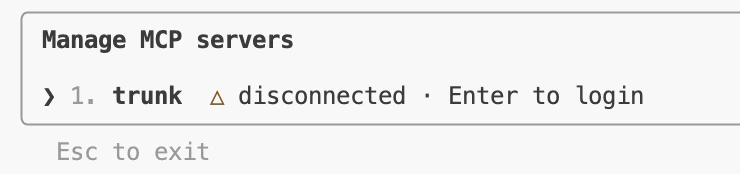
Claude Code should recognize that auth is required. Run /mcp to authenticate, select trunk, and hit Enter:
Alternative: Authentication with API token
If you are in a CI or headless environment, or prefer not to use the OAuth browser flow, you can authenticate with your Trunk organization API token instead. Find your token under Settings > API in the Trunk dashboard, then add it to your.mcp.json:
TRUNK_API_TOKEN environment variable to your org API token. Claude Code interpolates environment variables in MCP configuration files automatically.