


Documentation Index
Fetch the complete documentation index at: https://trunk-4cab4936-sam-gutentag-flaky-tests-new-monitors.mintlify.app/llms.txt
Use this file to discover all available pages before exploring further.
Entering the Queue
Can I add a pull request to the queue before all required checks pass?
Can I add a pull request to the queue before all required checks pass?
Why isn’t my pull request entering the queue?
Why isn’t my pull request entering the queue?
/trunk merge again in the PR.Why aren't my required checks triggering, even though my pull request is being tested in queue?
Why aren't my required checks triggering, even though my pull request is being tested in queue?
trunk-merge/ branches. It is also possible that your CI provider just randomly never started testing on the Trunk Merge Queue branch, even after setting the required status checks to trigger. To assist with this, you can configure a testing timeout.Merge Behavior
Can I choose the merge strategy for my pull requests?
Can I choose the merge strategy for my pull requests?
- Squash (default) - Combines all commits into a single commit
- Merge Commit - Preserves all individual commits and creates a merge commit
- Rebase - Replays commits on top of main for a linear history
How does Trunk handle commit messages
How does Trunk handle commit messages
- Squash (default): The commit message is automatically generated from the pull request’s title and description, following GitHub’s default behavior
- Merge Commit: Preserves all individual commit messages from the PR and creates an additional merge commit message
- Rebase: Preserves all individual commit messages from the PR as they are replayed onto the target branch
merge-commit-title: Your Custom Title on its own line in the PR body. See Custom merge commit titles for details.You can configure your preferred merge method in Advanced Settings.Do Optimistic Merging or Batching ever merge multiple pull requests into a single commit?
Do Optimistic Merging or Batching ever merge multiple pull requests into a single commit?
main branch’s history, regardless of your configuration.Features like Optimistic Merging and Batching are validation and testing strategies, not merging strategies.- Optimistic Merging uses the successful test of a pull request later in the queue to validate all the PRs ahead of it in the queue, allowing the entire sequence to be merged without waiting for the earlier PRs to finish testing.
- Batching allows the queue to test multiple PRs in a single CI job to save time and resources. After the test passes, the PRs in the batch are still merged one by one.
Queue Configuration
Can I create multiple merge queues for a single repository?
Can I create multiple merge queues for a single repository?
main, staging, release/v2). Each queue operates independently with its own settings, required statuses, and merge behavior. A branch can only be associated with one queue.To create an additional queue, click New Queue from the Merge Queue dashboard and select the same repository with a different target branch. See Multiple queues per repository for details.For validating significant changes to your CI process or queue configuration without impacting your primary workflow, you can use a fork of your repository. Set up and test a separate merge queue on the fork to make sure your changes work as expected before applying them to your primary repository.What are trunk-temp/* branches, and should CI run on them?
What are trunk-temp/* branches, and should CI run on them?
trunk-temp/* branches. Running workflows on them will only create unnecessary or canceled builds.The trunk-temp/* branch is a temporary, intermediate branch that the merge queue uses to assemble the necessary commits for a test run. Once the build is prepared, this branch is immediately renamed to a trunk-merge/* branch.Priority & Overrides
How can I merge a pull request immediately?
How can I merge a pull request immediately?
urgent priority is the only level that will interrupt currently testing PRs. Your PR will immediately begin testing, and other PRs will restart after yours completes.How do I merge an emergency pull request right now?
How do I merge an emergency pull request right now?
urgent priority is the only level that will interrupt currently testing PRs. Your PR will immediately begin testing, and other PRs will restart after yours completes.Failures, Errors & Debugging
How am I notified if my pull request fails in the queue?
How am I notified if my pull request fails in the queue?
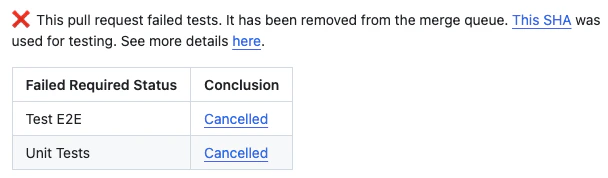
Why does my pull request consistently fail during testing due to "GitHub errors"?
Why does my pull request consistently fail during testing due to "GitHub errors"?
*/* applies to trunk-merge/.... The Trunk GitHub app does not have admin privileges, so it fails to do some actions on protected branches. To resolve this, you must remove this rule or reach out to Trunk on our community Slack if that is not possible.Why does my pull request keep failing to merge in the queue?
Why does my pull request keep failing to merge in the queue?
'allow squash merges' for this repo in your GitHub setup.Why do Dependabot and Renovate pull requests keep getting kicked from the queue?
Why do Dependabot and Renovate pull requests keep getting kicked from the queue?
- Both dependabot and renovate can be configured to not automatically rebase, while renovate can specifically be configured to only rebase if there’s a merge conflict (dependabot, renovate)
- Their PRs can be manually merged, and anything currently in the merge queue will restart with those merged changes